JCL expansion: see every job the way it really runs

The JCL eXpander in SMART TS XL shows every included proc, parm, DSN and symbolic variable as it appears at run time, without z/OS runtime comments, duplication or overlays. Search, view, analyze and map your JCL in a fraction of the time it takes on the mainframe.

36시간 → 9분reported by Thomson Reuters
모든proc, parm and DSN resolved
0mainframe cycles used
BUSINESS-CRITICAL INFORMATION

JCL contains business-critical information

To keep the business running, IT departments juggle targets and projects that have to work together reliably and continuously. JCL still runs high-volume mainframes. Coding standards help, but they do not stop errors or non-adherence from creeping into some JCL, and a single error can set back a fine-tuned mainframe workload when a job fails.

Because of the complexity of JCL and its included procedures, parameters and symbolic variables, working through errors or major changes can be a nightmare. That is why Software Intelligence® that shows developers the entire logic flow in one place is invaluable.

없이 SMART TS XL

  • Opening proc after proc to see what one step runs
  • Symbolics resolved in your head
  • Data sets traced by hand across jobs
  • Research that eats mainframe time

와 SMART TS XL

  • The full run-time view of any job, on one screen
  • Symbolics and overrides resolved for you
  • Every DSN analyzed, resolved and hyperlinked
  • Done on your SMART TS XL server, not the mainframe
당신이 얻는 것

Expand your JCL and lower risk

The run-time view

All included procs, parms, DSNs and symbolic variables shown as they appear in the JCL at run time.

Color-coded expansion

Expanded components are color coded, so you see exactly what was pulled in and from where.

Navigate by link

Links to and from expanded JCL, DSNs and referenced programs let you move through the job flow.

Every DSN analyzed

All data set names are analyzed and saved with their creation and usage parameters.

Search, print and map

Search, view, analyze, print and map your JCL in a fraction of the time it takes on the mainframe.

Impact across the mainframe

Combined with impact analysis, see how your JCL interacts with programs, files and other mainframe elements.

작동 원리

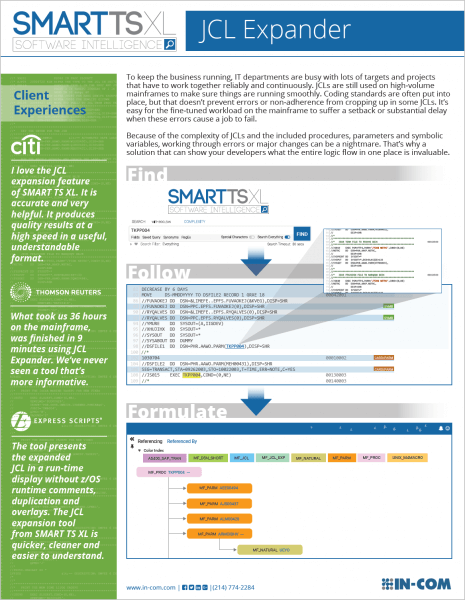
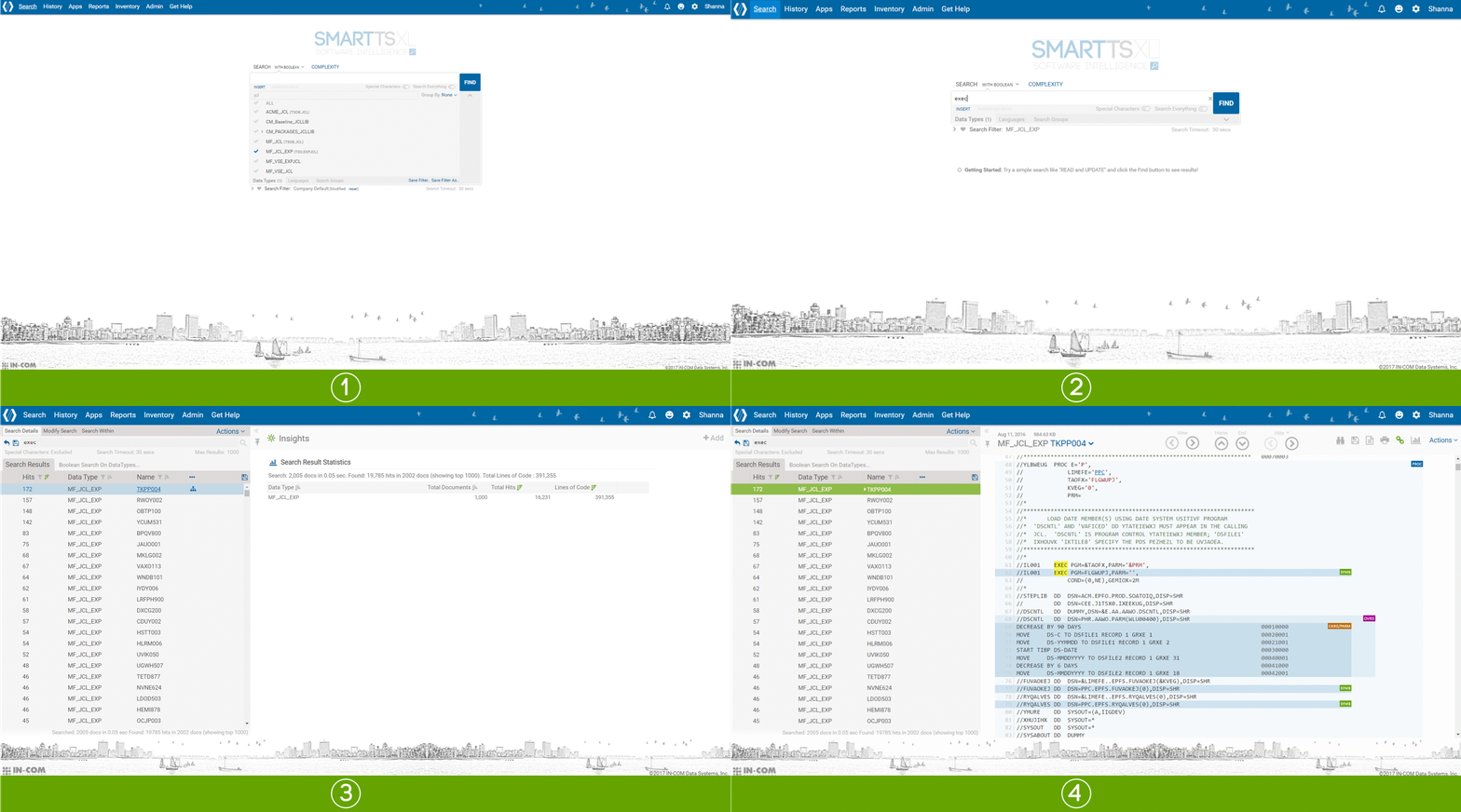
Find, follow, formulate

1

Find

Search for the job, proc, program or data set you care about.

PAYR0100
2

AI Physics로 발견의 범위 확장

Open the run-time view with every proc and parm resolved.

BUIR005 → HGZ00501
3

팔로우

Click through to the programs and data sets each step uses.

FOJOT405 · DAILY.TRANS
4

공식화

Build the cross-reference report for the whole job flow.

Tree or table view
AI를 통해 질문하세요

JCL Expansion, in plain English

이 페이지의 모든 내용은 질문으로도 활용될 수 있습니다. ASK AI 안에서 질문해 보세요. SMART TS XL또는 팀에서 이미 MCP 커넥터를 통해 사용하고 있는 어시스턴트입니다. 이 어시스턴트는 다음과 같이 호출합니다. SMART TS XL색인된 코드를 읽고 모든 사실에 대한 출처를 제공합니다. 읽기 전용이며, 직원들과 동일한 권한으로 작동합니다.

ChatGPT클로드부조종사쌍둥이 자리그록
AI 비서 + SMART TS XL예

Expand job PAYR0100 and list every data set it writes.

SMART TS XL · smartts_get_preprocessed_code
SMART TS XL · smartts_generate_cross_reference_report
색인된 코드에서 가져온 답변

PAYR0100 expands to 6 procs and 41 data sets. It writes 9 of them, including PROD.PAY.LEDGER(+1) in step 3.

  • 6 procs
  • 41 DSNs
  • 9 작성됨

예시 질문 및 결과

CLIENT EXPERIENCES

What JCL expansion teams say

“I love the JCL expansion feature of SMART TS XL. It is accurate and very helpful. It produces quality results at a high speed in a useful, readable format.”

CITI

“What took us 36 hours on the mainframe was finished in 9 minutes using JCL Expander. We’ve never seen a tool that’s more informative.”

톰슨 로이터

“The tool presents the expanded JCL in a run-time display without z/OS runtime comments, duplication and overlays. The JCL expansion tool from SMART TS XL is quicker, cleaner and easier to understand.”

EXPRESS SCRIPTS

자세히 살펴보기

Download the JCL eXpander brochure to see how SMART TS XL expands your JCL, step by step.

브로셔 다운로드
FAQ

Questions about jcl expansion

Does JCL expansion run on the mainframe?

No. JCL, procs and parms are loaded into SMART TS XL on your own server, and expansion happens there, so it uses no mainframe resources.

Does it work with Control-M and other schedulers?

SMART TS XL indexes scheduler definitions such as Control-M alongside JCL, so you can see what runs when and what each job expands to.

Can my AI assistant read the expanded JCL?

Yes. Through ASK AI or the MCP Connector, an assistant can expand a job and list its procs, programs and data sets, read-only.

See jcl expansion on your own code.

In a live session we load a sample of your portfolio and run jcl expansion in the web interface and through the AI assistant you already use.

대한 새로 SMART TS XL? 플랫폼이 어떻게 구성되어 있는지 확인해 보세요 →