


The Fastest and Most Comprehensive Application Discovery and Understanding Platform

Identify:
– application dependencies
– redundant source code
– crucial program documentation
– important fields
– complex program structure
Supporting Over
2.7B
Lines of Code
More Than
1.9M
Annual Searches
Used By
15521
Professionals
Only
1
Solution
SMART TS XL is an application discovery platform made for today’s complex and hybrid IT stacks. It supports any platform and any language, making cross-platform analysis a breeze. Break down silos, support DevOps initiatives, and inform business analyst efforts across all stages of the application discovery and support process.
The patented Software Intelligence® technology searches and analyzes millions of lines of code, hyperlinks referenced items, and provides in-depth dependency mapping. With results in a matter of seconds, there’s no more waiting minutes, hours or days for a complex mainframe scan.
SMART TS XL is the only platform that also supports important non-programmatic items like database schemas, change management resources, ticketing systems, documentation and more.
End-to-end visibility
One centralized repository allows for all enterprise assets to be automatically catalogued and easily accessed.
Powerful reporting
Reporting features are easily accessible at any point during your process. In a few clicks, you can instantly create and share reports, diagrams or flowcharts.
Accurate cross-platform impact analysis
Map application dependencies across multiple languages and platforms and discover the impact of potential changes.
Improved application quality
Pinpoint bugs, identify redundant or inefficient areas of code, and enforce quality coding practices.
Open APIs for customization
Enhance existing features, integrate with other systems or create new apps with robust open APIs
Quickly close knowledge gaps
Create documentation for unknown or undocumented applications, and bring everyone up to speed with powerful code understanding tools.
“SMART TS XL is an invaluable tool in my everyday tasks. To help provide the business with quick and accurate estimates and answers; SMART TS XL is the tool to use. There are several cases where a question will be asked of IT by the business and as usual it is needed 15 minutes ago.
“With the versatility of SMART TS XL I am always able to do a few quick searches and I will instantly have the number of modules, the extent of which these modules use certain datafields, and trace back and flow through information letting me know how certain data flows through our system. With this information I can quickly give the business an accurate estimate and an answer as to the feasibility of any solution to their issue.”
The Ideal Solution for Your Business Needs
SMART TS XL is a fast, web-based tool for search, code assessment, and impact analysis across Mainframe, AS400, UNIX, and distributed applications. It supports all platforms and programming languages, processing billions of lines of code in seconds. Designed for both modern and legacy systems, SMART TS XL offloads workloads from costly Mainframe or AS400 environments, saving costs and freeing up processing power.
It discovers, traces, and graphically displays relationships within your applications, covering languages and assets like COBOL, JAVA, RPG, C++, DB2, .NET, UNIX scripts, and more. With color-coded visuals and drill-down capabilities, it reveals companywide dependencies, including third-party and in-house systems.
SMART TS XL helps streamline scoping, impact analysis, and search, improving project timelines and budgets. It also provides quick, accurate estimates for resource and time management. Clients like Citibank, BCBS, and DST Systems have each saved over $3 million using SMART TS XL.
SMART TS XL is ideal for industries like banking, healthcare, insurance, telecommunications, and manufacturing. Companies with complex IT environments, including legacy and modern systems, such as Citibank, BCBS, and DST Systems, can benefit from its powerful code analysis, impact assessment, and project management capabilities to optimize resources and reduce costs.
Application Understanding and Impact Analysis Tools


Code Search Engine
Advanced code search capabilities allow you to search and analyze vast and varied data repositories from one place.
In a split second, you have results that help you:
– Search the entire application portfolio for everywhere a field is used
– Find every instance of an error message buried in code
– Identify areas of business logic critical to the enterprise

Document Search
Search your enterprise documents for the information that you need. We support any text-based asset, including word documents, spreadsheets, presentations and countless other formats.
Instant access to enterprise documents helps you:
– Discover relevant information when researching a project
– Transfer knowledge between new and existing teams
– Prevent the loss of valuable knowledge when an employee retires
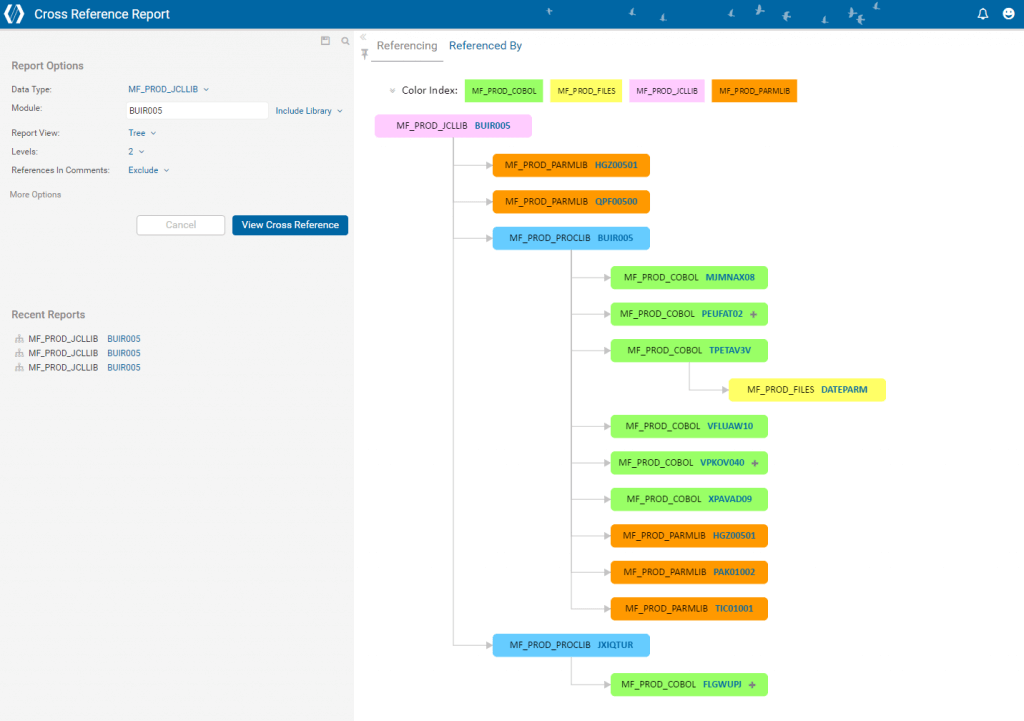
Impact Analysis
Accurately predict the impact of changes with robust impact analysis capabilities. Hyperlinks allow you to easily move between referenced elements, and color-coded diagrams give you a visual of how and where they interact.
With the ability to see relationships and impact points across your entire application portfolio, you can:
– Follow hyperlinks between referenced elements
– Determine the scope of work in a project by identifying relationships between elements
– Immediately pursue your flow of thought when researching programs or other modules

JCL eXpander
This time-saving JCL expansion tool displays all Procs, Parms, DSNs and other symbolic variables referenced in the JCL. You can read your JCL as it would look at run-time without looking up each individual element.
This tool gives you the ability to:
– Search, analyze and map your JCLs in a fraction of the time it would take on the mainframe
– Evaluate projects and gain a clear understanding of all parts of your JCLs

COBOL eXpander
The COBOL eXpander inserts Copybooks into the COBOL program where they are are referenced to show you how the program looks at run-time. You can read your COBOL program as it would look at run-time without looking up each individual element
By seeing expanded Copybooks in your programs you can easily:
– Save time spent researching for modification or maintenance
– Review all referenced Copybooks in one place

COBOL Field Tracker
Use the Field Tracker tool to see the ripple effects of changing a field in COBOL programs and any included Copybooks. This tool makes projects easier by instantly finding and tracking field movement in a program.
The COBOL Field Tracker helps you:
– Find fields based on the type of operations they are in
– Identify relationships between found fields by performing iterative searches
– Save time spent on repetitive field movement research

Control Flow Diagram
This powerful tool generates an interactive control flow diagram for the program you select. The diagram renders a complete picture of how the program works and provides you with multiple levels of detail.
When it comes to mission-critical projects, this flowcharting capability helps you:
– Document the structure and flow of existing legacy programs
– Increase productivity by providing understanding of complex program logic

Program Complexity Report
Estimate project complexity and determine timelines with the help of reports that detail program difficulty, suspected number of bugs, level of effort, hours required, and other measures. Complexity reports are calculated based on the Halstead complexity methodology and industry standards.
These reports provide an in-depth understanding of your application portfolio so you can:
– Create a project plan based on programming language, source library, data type or project
– Use the reports and metrics to give assignments to the right people
FAQ
General Information
SMART TS XL is an advanced tool designed to analyze, search, and visualize dependencies across multiple programming languages and platforms, providing insights into code structure, dependencies, and impacts.
Information from any platform can be loaded into SMART TS XL – mainframe, iSeries, Linux, PCs and other distributed assets.
Information from any platform can be loaded into SMART TS XL – mainframe, iSeries, Linux, PCs and other distributed assets.
Installation and Setup
The installation process involves setting up an application server for SMART TS XL and a SQL server to host the database. Responsibilities include hardware provision, Admin, and Login accounts by the client, while IN-COM installs the SMART TS XL software, defines data types, configures automation scripts, and provides training.
No, nothing is installed on the mainframe. The only installations are on the SMART TS XL application server and the SQL server.
An application server for SMART TS XL and a SQL server to host the database are required. The setup is similar to the pilot setup, with performance tests to determine the appropriate specifications.
Data Loading and Integration
Source code data can be either pushed to the SMART TS XL server via FTP or NDM or pulled using prepackaged connectors and tools provided with SMART TS XL. Data types and names can be created using the SMART TS XL Management Tool directly on the application server.
Loading 1000 COBOL programs, each approximately 10,000 lines of code, takes less than 10 minutes, including the FTP process.
Yes, SMART TS XL integrates with various version control systems such as Bitbucket, TFS, SVN, Git, and more, allowing changed application components to be parsed and loaded into the tool’s environment with minimal manual intervention.
Usage and Features
Yes, SMART TS XL supports multiple programming languages including Go, Java, .NET, and more. It also supports cross-platform dependencies and provides runtime views with expanded COBOL and JCL.
Expanding COBOL and JCL allows users to search for runtime versions of the code, handle symbolic variables, and accurately perform impact analysis, complexity analysis, and field tracking. Expanded COBOL helps in searching runtime versions, handling REPLACE BY syntax, and accurate flowcharting, while expanded JCL supports symbolic variables, nested PROCs, and Parmlib content searches.
SMART TS XL supports complex Boolean searches and can search billions of lines of code in seconds. Users can perform detailed cross-reference reports, flowcharting, and CRUD reporting, and create custom queries for various needs.
While SMART TS XL does not have a built-in code quality checker, it logs syntactical errors during the loading process and allows for creating searches to identify bad coding practices. Code quality checking and security analysis are included in the tool’s roadmap.
Security and Access
User access can be controlled using Active Directory with or without Single Sign-On (SSO), or by using SMART TS XL’s built-in User/Password security. Security can be configured to restrict access to specific data types or down to the document level.
Yes, every search performed is audited and saved, and supports generating reports showing which user logged on and what elements were viewed.
Support and Training
IN-COM offers on-site user training, computer-based training (CBT), and two complimentary seats at the annual SMART TS XL Admin seminar. Additional remote service hours and customized project-specific training are also available.
Response time for critical issues is 4 hours, and IN-COM provides support to ensure a positive client experience with SMART TS XL.
Yes, SMART TS XL supports business rule mining using complex Boolean searches and program flowcharting tools that detail business logic/rules.
Additional Questions
Yes, SMART TS XL supports any programming language from any platform and shows cross-platform dependencies.
Information can be either pushed or pulled to the SMART TS XL application server. From mainframes, data is pushed via FTP or equivalent methods. For distributed systems, SMART TS XL supports source control connectors for systems like Bitbucket, TFS, SVN, etc. It also has connectors for databases such as Oracle, SQL, Teradata, DB2, and more.
SQL is used for the repository.
Yes, SMART TS XL allows you to search and find any item across the enterprise. It provides program-level views and allows drilling down into the code, such as tracking COBOL fields and viewing their flow at the field level.
You can search for variables inside copybooks and see a program-level flow from the copybook to the COBOL programs that use it. The Infinity Search feature enables this functionality.
Expanded COBOL refers to bringing copybooks into the source code, providing a runtime view with the copybooks visible in-stream in the COBOL program. It also expands JCL, including procs, cards/parms, symbolic substitutions, and overrides.
Yes, SMART TS XL supports Control-M out of the box and allows users to see dependencies between jobs and scheduling information. For specific needs related to Control-M symbolic variables, a tailored solution can be discussed.
While SMART TS XL does not customize its database schema for such details, it provides tools to append attributes to module content from AMB listings. Custom reports can be created using public APIs to display additional attributes if needed.
SMART TS XL allows to load all mainframe information, including VSAM records and customer letter templates, into the tool. This frees up valuable mainframe resources by offloading searches, scans, discovery, and analysis. Companies achieve faster response times, accurate impact analysis, and millions of dollars in MIPS savings.
By using SMART TS XL APIs, companies are able to design a solution to search for any version of a stored information in the system, view the code elements that assembled the information, and see a preview of the resulting document, improving efficiency and reducing the need for ad-hoc queries.
SMART TS XL displays all relationships and dependencies between systems, enabling efficient planning of changes and real-time responses to problems. It helps diagnose, solve, and prevent failures, increasing overall efficiency and reducing development, software, and hardware maintenance costs.
SMART TS XL helps companies investigate failures, identify critical impact points, understand error messages, and prevent future failures by examining past cases, ultimately improving processes and work efficiency.
SMART TS XL made the impact analysis process up to nine times faster and code discovery up to 18 times faster. It provided accurate impact analysis across the entire application portfolio, resulting in $5M savings in the first year.
The expanded JCL feature, which shows Procs and Parms in-line with the JCL, helps companies identify and build accurate component lists of affected items quickly, preventing extended outages.
